


Sun Life Dental (U.S.)
4.753.00 Reviews
App Specs
- Version
- 8.0.7
- Updated On
- License
- Free
- Downloads
- 50,000+
- Developer
- Sun Life Financial (U.S.)
- Categories
- Medical
- Platform
- Android
Screenshots
 Analysis by AppCompare
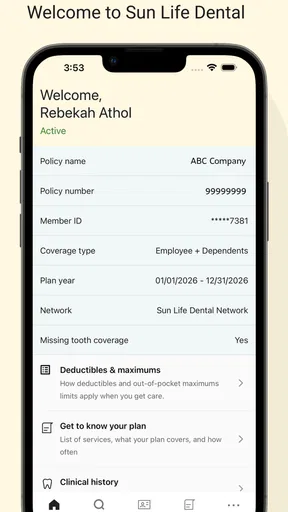
Dental care becomes much less stressful when the practical details are in one place. In my experience, the hardest part is often not choosing a dentist or attending an appointment; it is finding the right office, checking whether a claim has moved forward, and locating the card that proves coverage when someone asks for it. Sun Life Dental is built around those everyday tasks for members of Sun Life Financial (U.S.), and its approach is refreshingly focused rather than overloaded with unrelated health tools.
This free medical app is aimed at people who use Sun Life dental benefits and want a mobile way to handle routine account tasks. I see it as a companion to dental insurance, not as a replacement for a dentist, an emergency service, or a general health tracker. That distinction matters. The app can help organize the administrative side of oral healthcare, while diagnosis, treatment decisions, and urgent care still belong with qualified professionals.
From needing dental information to having it ready
I find the most useful way to judge a dental-benefits app is to follow the information through the whole appointment, rather than focus on any single screen. Sun Life Dental is designed for the practical moments around care: preparing to choose an office, having coverage details ready, and checking back after a visit. That makes the next section a good place to consider what happens when those tasks come close together.
The starting point: a small problem with several steps
A realistic example is a new employee who needs a dentist after moving to a different area. The usual process can involve searching separately for offices, calling to ask about insurance, digging through email for an identification card, and later trying to understand whether a submitted claim has been processed. None of those jobs is especially difficult on its own, but together they create unnecessary friction.
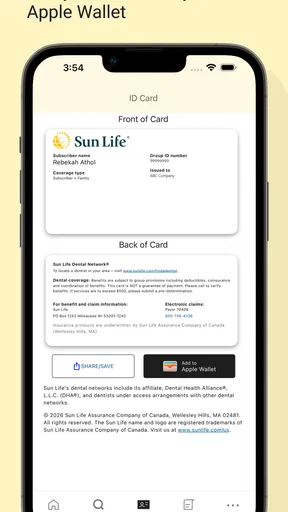
That is where Sun Life Dental makes the most sense. Instead of treating the app as a broad wellness destination, I use it as a focused control point for dental-benefit information. The store summary highlights three practical jobs: finding a dentist, viewing claims, and saving an ID card. Those functions cover the moments when a member most often needs quick access to insurance details.
The app is listed in the Medical category and comes from Sun Life Financial (U.S.). It is free to use, with an Everyone content rating, so it is suitable for a wide range of members and households. Its current version is 8.0.7, and it runs on Android 7.0 or later. That older minimum operating-system requirement is useful for people who keep a reliable phone for several years rather than upgrading frequently.
Sun Life Dental has an average rating of 4.6 from around one thousand ratings, with dozens of written reviews, and it has passed the fifty-thousand-install mark. Those figures suggest that the app has found a clear audience, but I would not treat popularity as proof that every dental-plan workflow will feel identical for every member. Your experience still depends on the plan connected to your account and on the information you need at that moment.
Worth Reading Before You Choose

EA SPORTS FC Mobile 26 Is a Bigger Football Game, but It Takes Time

Flipboard Shows What News Apps Must Do Beyond the Feed

Switching to Android Auto Means Rethinking Your Driving Routine

Google Calendar Makes a Crowded Week Easier to Manage

Ludo King Makes the Most of the Minutes Between Plans

Baby Panda World Brings Quick Play to Modern Phones, but Its Game Library Feels Busy
Step one: begin with the task, not the menu
My preferred way to use this app is to start with a specific question. Am I trying to locate a dentist, show proof of coverage, or check a claim? That simple habit prevents the app from becoming another place where I browse without accomplishing anything. If I am preparing for a first visit, the dentist search is the logical starting point. If the office is asking for coverage information, the ID card is more useful. If treatment has already happened, claims are the area to inspect.
This task-first approach is one of the app’s quiet strengths. Dental insurance apps can become confusing when they present too many account details before the user knows what to do. Sun Life Dental is easier to understand when I treat each main function as a separate short workflow rather than trying to learn the entire application at once.
For someone joining a plan, I would open the app before calling a dental office and make sure the account information and card are easy to reach. That preparation can make the conversation with the office more efficient. It also reduces the chance of arriving at an appointment while searching through old messages or paper documents.
Step two: finding a dentist without stopping at the search result
The dentist-finding function is most useful as a starting point for research, not as a final recommendation. I would use it to narrow the options, then contact the office directly before booking. A directory can help identify a convenient choice, but the office remains the best place to confirm practical details such as whether it is accepting new patients, whether the preferred appointment time is available, and whether the staff can process the member’s plan information.
This is an important handoff. The app can help me move from “I need a dentist” to “these offices may be relevant,” but the dental practice takes over for scheduling and care. I would not assume that appearing in a search automatically answers every question about a visit. Calling first is especially sensible when the appointment involves a specialist, a child, a complicated procedure, or a tight deadline.
A useful strategy is to save the details of the office I am considering outside the app as well, such as in my phone contacts or calendar. That creates a simple bridge between insurance research and the real appointment. The app helps with the coverage side; the calendar and the provider handle the attendance side. Keeping those roles separate makes the overall process clearer.
Step three: preparing the ID card before the appointment
The digital ID card is more valuable when prepared in advance than when opened in a reception area. I would check it before leaving home, especially if I am visiting a new office or helping a family member. Saving it for quick access means I am less dependent on finding a paper card or remembering which message contained the relevant information.
The word “save” is important here because the card is not merely something to glance at once. A stored digital copy can be a practical backup during a routine visit. Still, I would keep the app available and avoid assuming that a saved card replaces every question the office may ask. Reception staff may need additional details, and the provider’s own process remains part of the handoff.
For families, this workflow can be particularly helpful. A parent who manages several appointments can prepare the relevant card before each visit instead of searching at the counter. For older relatives, the app may be useful if a trusted person helps with administrative tasks, although account access should always be handled carefully and only with the member’s permission.
Step four: checking a claim after care
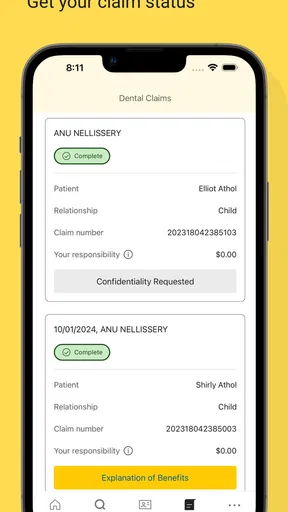
Claims are where the app shifts from preparation to follow-up. After an appointment, I would use the claims area to see whether the dental visit has progressed through the insurance process. This is more useful than repeatedly calling without any reference point, because it gives me a place to begin when I need to understand what happened after treatment.
The best workflow is to check the claim when there is a genuine reason, such as waiting for an update or reviewing a recent visit. I would avoid treating the app as an instant explanation of every bill. A claim view can show progress, but the amount charged by a dental office, the amount covered, and the member’s responsibility may involve details that still require a conversation with Sun Life or the provider.
This is another important handoff: the app gives me visibility, but it does not remove the need for human clarification when the numbers or treatment details are confusing. If something looks unexpected, I would compare the claim information with the office receipt and then contact the appropriate party. The app is most effective as a reference point that helps make that conversation more precise.
How the pieces connect in a normal day
Imagine that I notice a tooth problem and need a new dental office. I begin by using the provider-finding function, select a practical option, and contact the office to discuss availability and plan acceptance. Before the appointment, I open the digital ID card so it is ready rather than relying on memory. After treatment, I return to the app to review the claim and use the information there if I need to ask a question.
That sequence shows the app’s real value: it supports the journey before, during, and after a dental visit without pretending to be the dental office itself. The outcome is not a diagnosis or a treatment plan. The outcome is a more organized benefits process, with fewer moments spent hunting for basic insurance information.
Where the handoffs become less smooth
The main limitation is that the app cannot control the parts of the process owned by other people. A dentist’s schedule, office procedures, claim handling, and billing explanations all sit outside the app. Even a well-designed mobile tool cannot guarantee that a provider will answer quickly or that a claim will be easy to interpret.
I also think users should avoid making the app their only record. A digital ID card is convenient, but keeping important appointment details and billing documents in an additional safe place is sensible. If a phone is unavailable, damaged, or out of battery, a backup can prevent a small technical problem from becoming a reception-desk delay.
Another possible friction point is fit. Sun Life Dental is most useful to people whose dental benefits are connected to Sun Life Financial (U.S.). Someone looking for a general dentist directory, a symptom checker, oral-hygiene coaching, or a universal insurance wallet may find the app too narrow. In those cases, a provider’s own booking system, a general health app, or direct contact with an insurer may be a better match.
I would also skip it if I rarely handle dental-benefit administration and already have a dependable paper or web-based routine that works. Installing another app is not automatically an improvement. Its advantage appears when I regularly need the card, want a mobile view of claims, or are actively looking for a dentist connected to my benefits.
How it compares with the usual alternatives
The first alternative is a browser-based member portal. A website may be preferable when I am working at a computer, comparing several documents, or handling a longer administrative task. Sun Life Dental has the advantage during a quick appointment-related moment, when opening a phone app feels more direct than navigating a browser and signing in again.
The second alternative is calling customer service. A phone conversation remains better when a claim is unclear, a billing issue is complicated, or I need a person to explain plan-specific details. The app wins for checking information without waiting, but it does not replace the judgment and clarification that a representative can provide.
The third alternative is relying on the dental office. A provider can often help with scheduling and may know how to submit information, but the office is not a substitute for having my own benefit details available. Keeping the ID card and claim view close at hand gives me more control, especially when I am dealing with a new practice.
Compared with a broad health application, this one is less ambitious and therefore easier to judge. It does not need to track exercise or medication to be useful. Its value comes from staying close to dental insurance tasks. The trade-off is focus: fewer distractions, but also fewer reasons to open it outside those specific moments.
Practical habits that make the app more useful
- Prepare before the handoff: open the digital ID card before arriving at a new office, rather than waiting until registration.
- Use the directory as a shortlist: contact the dental practice to confirm the details that affect the actual appointment.
- Check claims with documents nearby: having the receipt or provider statement available makes unusual entries easier to discuss.
- Keep a second record: store appointment information and important billing paperwork somewhere dependable outside the app.
- Separate urgency from administration: use a dentist or appropriate medical service for symptoms and urgent care, not an insurance-management tool.
These habits also answer a common concern: is the app useful if I only visit the dentist occasionally? I think it can be, provided the user prepares it around those visits rather than expecting daily value. The ID card and provider search are most helpful before an appointment, while claims become relevant afterward. Its usefulness is event-based, not continuous.
Who should install it
I would recommend Sun Life Dental to members of Sun Life Financial (U.S.) who want a simpler way to manage the administrative side of oral care. It is especially suitable for people changing dentists, moving, keeping track of a recent claim, or managing appointments for more than one person. The free price removes the usual hesitation about trying it, and the Everyone rating makes it approachable for household use.
It is also a sensible choice for anyone who dislikes carrying paper cards or searching through email. Having the relevant information connected to a focused dental app can make a short visit feel more orderly. The older Android compatibility is another practical benefit for users who do not have a recent device.
I would not recommend installing it solely for dental advice, emergency guidance, or detailed treatment planning. Those are different needs. Someone without Sun Life dental coverage may also gain little from it, because the key workflows depend on the relationship between the member, the plan, and the participating provider information.
My final assessment after following the full workflow
Sun Life Dental succeeds by concentrating on the moments that usually create small but irritating delays: locating a dentist, showing an ID card, and checking what happened to a claim. I like that its role is easy to understand. It does not try to turn insurance administration into a social network or a wellness dashboard; it gives members a mobile place to begin and continue a dental-benefit task.
Its limitations are equally clear. The app cannot schedule care for every situation, explain every billing question, or replace communication with a dental office and insurer. Users who expect a complete oral-health service may be disappointed, while users who want a convenient benefits companion are more likely to appreciate the focused design.
My recommendation is straightforward: if Sun Life Financial (U.S.) manages your dental benefits, install it before you need it. Set up your routine around the three main moments—searching, presenting coverage, and following a claim—then keep the relevant backup information elsewhere. Used that way, Sun Life Dental is a practical free medical app that turns a scattered insurance workflow into a more manageable one.
Pros
- Easy access to dental plan details and coverage information.
- Find participating dentists using the in-app provider search.
- Digital member ID is convenient at dental appointments.
- Claims and benefit information are available in one place.
- Useful reminders can help users stay aware of dental care needs.
Cons
- Features may depend on having an eligible Sun Life dental plan.
- Provider search results may require verification before booking.
- Some claims or updates may take time to appear.
- Account setup requires personal and insurance information.
- App usefulness is limited for users outside the United States.
FAQs for Sun Life Dental (U.S.)
What is Sun Life Dental (U.S.)?
Sun Life Dental (U.S.) is a mobile resource for members of eligible Sun Life dental plans. After signing in, users can typically review plan information, check coverage details, access digital identification cards, search for participating dentists, and view claims or account-related updates. The exact features available depend on the dental policy, employer plan, location, and member permissions.
Who can use the Sun Life Dental app?
The app is intended primarily for Sun Life dental plan members in the United States, and some features may also be available to covered dependents or authorized users. You generally need an active Sun Life account and valid member information to register or sign in. Availability can vary by plan, employer, state, and whether your coverage is administered through Sun Life.
What can I do with Sun Life Dental (U.S.)?
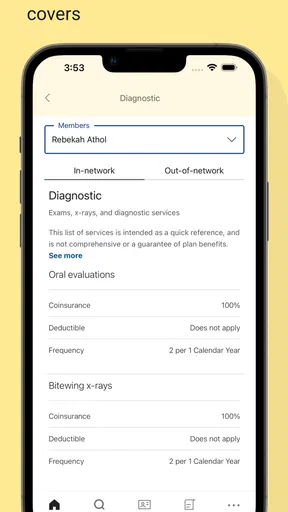
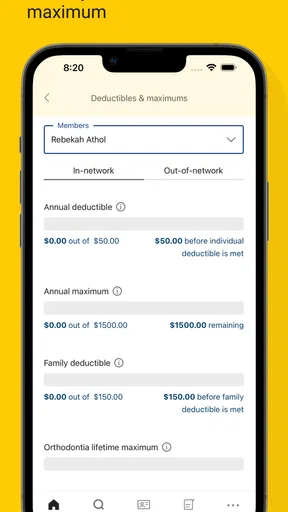
Depending on your plan, Sun Life Dental may allow you to view coverage and benefits, check deductibles or remaining maximums, find in-network dentists, display an electronic member ID card, review claims, and access customer-service information. These tools can make routine account management easier, but the app should not be treated as a substitute for confirming treatment costs directly with Sun Life or your dental provider.
Is Sun Life Dental free to download and use?
The Sun Life Dental app is generally free to download from the supported app store, although normal mobile data charges may apply. Downloading the app does not create dental insurance coverage and does not replace premiums, deductibles, copayments, coinsurance, or other plan costs. Before relying on displayed benefit information, confirm that your policy is active and review the terms of your specific plan.
Is Sun Life Dental safe, and what should I do if I cannot sign in?
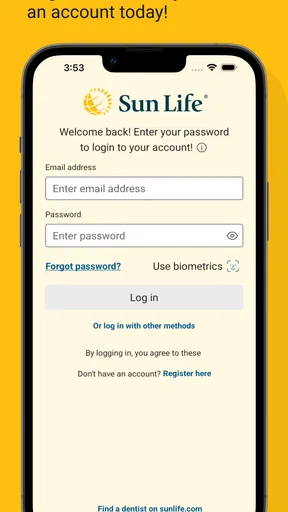
The app is designed to provide access to personal dental-plan information, so users should download it only from an official app store and keep their login details private. If sign-in fails, check your internet connection, verify your username and password, and use the available account-recovery option. Persistent problems may require contacting Sun Life member support, especially after a recent enrollment or plan change.


